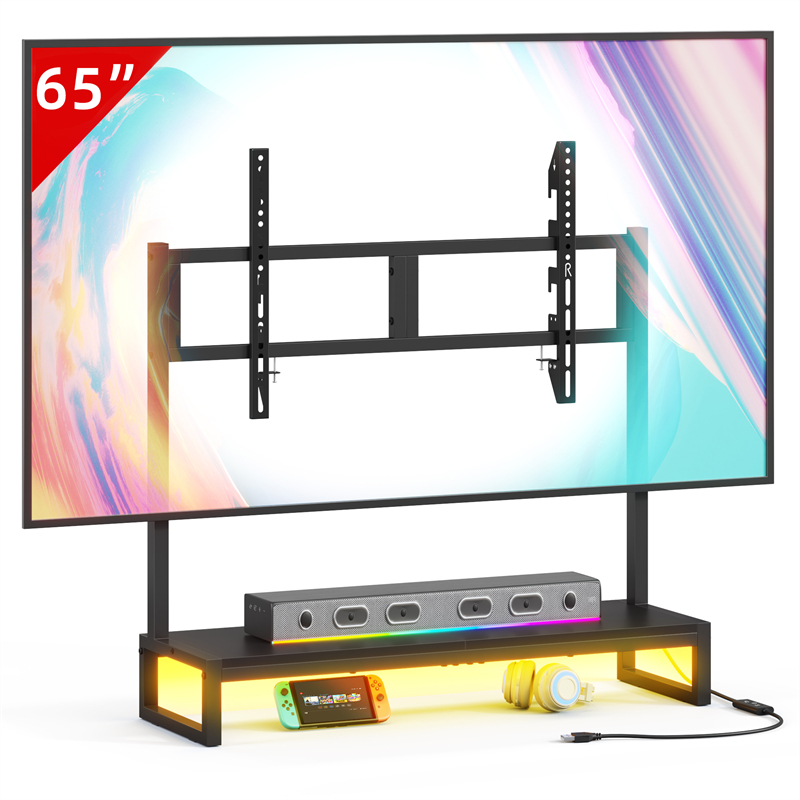
Read the Soundbar Manual Before Choosing a Spot on the Stand
The soundbar manual is the first check because its support and clearance requirements belong to the soundbar, not to the furniture listing. Look for whether the maker intends it to rest on furniture, whether it requires a particular clearance around vents or the screen, and whether the supplied feet or base must sit on a flat surface. If the manual specifies wall mounting or a different support, do not substitute the TVS027 top.
Look beyond the soundbar's overall width. The manual may show where its feet sit, how much space its connections need, and whether it can be placed close to a television. If the manual is unavailable, ask the soundbar maker or seller for the placement instructions for that exact model. A low profile in a product photograph is not evidence that the soundbar may sit in front of a screen without obstruction.
Compare Both Footprints With the Stand Top
The soundbar and television need separate stable contact with the TVS027 top, so compare their footprints rather than only the soundbar width. Measure the soundbar's depth and the position of its feet or base, then measure the television's feet or stand base and the space between them. The soundbar should not press on the television's feet, lean against the screen or rock because part of its base is unsupported.
The TVS027 catalogue entry does not provide top width, depth or load rating, so obtain those figures from the seller before deciding that the two devices can share it. If either footprint overhangs the usable top, if the soundbar and television cannot both sit flat, or if the seller cannot confirm the load, use a separate stable surface. A combined setup saves floor space, but it should not rest on an assumed capacity.
Protect the Screen Edge and the Remote Sensor Path
A soundbar in front of the television can cover the lower screen edge or the television's remote receiver, and either obstruction matters even if the soundbar looks low. Check the soundbar's top height against the bottom of the visible screen from your usual seat, not only against the stand surface. Also use the television manual to find the remote receiver, since it may sit on the front edge, below the screen or elsewhere.
Test the remote from where you actually sit once the soundbar is in place. An infrared remote needs a clear line of sight, while radio-frequency or Bluetooth control may not, but the television manual remains the safer source for the exact model. If the soundbar covers the receiver, move the soundbar to a separate surface or choose a different arrangement. Do not assume the obstruction will be harmless because the soundbar is short or because a photograph shows it below the picture.
Check Cable Access, Power and Ventilation
A soundbar placement is practical only if you can reach its ports and the television's ports without moving the soundbar every time, and if neither device has its ventilation blocked. Map the soundbar's power lead, audio connection and any accessible controls, then check whether putting it in front of the television hides a port you need or traps a cable against the wall or stand. The TVS027 listing gives no cable openings, so do not assume a route through the stand.
Keep cables slack enough to reach their ports without pulling the soundbar forward, and follow both device manuals for ventilation and connection clearance. A soundbar that sits across the television's lower vents or its own vents is a poor arrangement even when the footprint appears to fit. If a cable forces the soundbar to overhang, if a connector cannot be reached, or if either device needs clearance that the position does not provide, choose a different location before using the setup.
Use the TVS027 Only After Confirming Its Missing Details
The TVS027 can be considered for a combined television and soundbar setup only when the seller confirms the usable top dimensions and load rating and both device manuals accept the arrangement. Ask specifically for the top width and depth, the stated load rating and whether the top is intended to support equipment in addition to a television. The model name and catalogue photographs do not answer those questions.
If those details remain unknown, the safer buying decision is not to treat the TVS027 as a soundbar shelf. Use a separate stable surface or compare a different stand whose seller documents the needed figures. The trade-off is clear: a single-surface setup can keep the television and soundbar together, while a separate surface avoids relying on unconfirmed fit and capacity but adds another piece of furniture and another cable route.
Explore related furniture
Who this helps
A reader already owns a television and a soundbar and is considering the TVS027 tabletop stand as the single surface for both in a living room or bedroom.
How to make the choice
Place the soundbar on the TVS027 only when the seller confirms usable top dimensions and a load rating, the soundbar and television support footprints can both sit without unstable overhang, and the soundbar and television manuals allow that arrangement. Otherwise choose a separate stable surface or a different stand. The trade-off is a compact single-surface setup against unverified fit and capacity.
Information behind this guide
The TVS027 catalogue entry confirms only the model name and tabletop TV stand type. It does not confirm top dimensions, load rating, material, mounting pattern or cable openings. Fit and compatibility statements in this article are checks for the buyer, not verified product specifications; use the soundbar and television manuals and ask the seller for missing figures.
Your decision checklist
- Measure the soundbar's width, depth and the position of its feet, then measure the television's base or feet and the clear area they need on the stand top.
- Ask the seller for the TVS027 top dimensions and load rating, because the listing confirms only the model and tabletop stand type.
- Compare the soundbar's height with the bottom edge of the screen and the television's remote sensor location, using the television manual rather than a photograph.
- Read the soundbar manual for required clearance, support and ventilation, and follow its placement limits before putting it on the stand.
- Trace the soundbar power lead and any audio cable to the outlet and television ports, leaving enough slack to reach the ports without pulling the soundbar from position.
- If top size, load or stability cannot be confirmed, place the soundbar on a separate stable surface instead of the TV stand.
Related questions
Can a soundbar sit directly in front of a TV on a tabletop stand?
Only when the soundbar maker allows that placement, the soundbar does not cover the screen edge or the television's remote sensor, and the stand's confirmed top dimensions and load rating support both devices. The TVS027 listing gives only the model and tabletop stand type, so those stand details are unconfirmed. If any check fails or remains unknown, use a separate stable surface.
Does the TVS027 listing state a soundbar weight limit?
No. The supplied TVS027 entry confirms only the model name and that it is a tabletop TV stand. It does not give a top load rating, top dimensions, material or mounting details. Ask the seller for the load rating and usable top size, then compare them with the soundbar and television documentation. Do not treat the model name or photographs as a capacity figure.
Will a soundbar block the TV remote?
It can if the television uses an infrared receiver that the soundbar covers and the soundbar sits in the line of sight. Check the television manual for the receiver location, then test the remote from your usual seat with the soundbar in place. Radio-frequency or Bluetooth remotes may behave differently, but the device manuals remain the source. If the remote fails, change the placement rather than assuming it will improve.