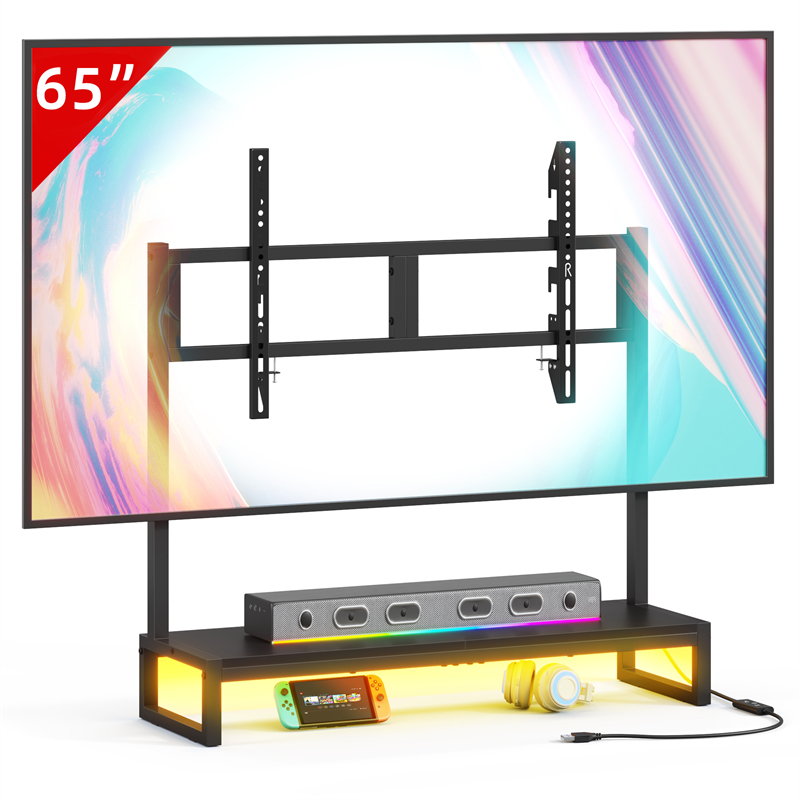
Why a desktop TV stand is a different decision from a floor stand
The classic television decision is floor stand or wall mount. A desktop TV stand adds a third option: a screen that rests on furniture you already own, such as a desk, a low cabinet, a dresser or a counter in a small studio. That can be the least disruptive choice in a rented flat, a dorm room or a bedroom where you do not want holes in the wall and you do not want another set of legs competing for floor space.
The trade-off is that everything now depends on the surface underneath. A desktop stand does not create space; it relocates the problem to a piece of furniture that may already be carrying a lamp, books or a monitor. So the planning question is not only which stand to buy, but whether the spot you have in mind can carry a screen safely, at a height you can actually watch.
Where the TVS027 Desktop TV stand fits in a small-space plan
GYIIYUO lists the TVS027 Desktop TV stand within its TV furniture range, alongside larger pieces such as the TVS020 TV Cabinet Model A (Light Strip) and the TVS002 TV cabinet 63 inches Black. The name signals the intent: a stand for a desktop-style arrangement, where the screen sits above a working or storage surface rather than directly on the floor.
Before you plan around it, be clear about what the catalogue data in this guide does and does not contain. The entry for TVS027 gives the product name and a set of product images. It does not state dimensions, materials, weight limits, assembly details or included fittings, and this guide will not invent them. Those are exactly the numbers you need, so the sensible next step is to open the product page at https://gyiiyuo.net/products/tvs027-desktop-tv-stand-22 and read the specification as published there, or ask the seller directly. Do not assume a fit simply because one stand looks similar to another.
Measure the screen before you measure the stand
Your television, not the furniture listing, is the source of truth for the screen side of the equation. Before shopping, note four things from your TV manual or the label on its back: the diagonal size, the overall width and depth including any feet or pedestal, the weight, and the mounting pattern if you intend to attach anything to the back. Also note the height of the screen's own base if it has one, because that affects clearance.
Write those numbers down. When you compare them with a stand, you are checking three relationships: the screen's footprint against the supporting platform, the screen's weight against whatever load figure the seller publishes, and the screen's height against your seated position. If the seller does not publish a load figure, treat that as an open question rather than an invitation to guess.
Check the surface, not just the stand
A desktop arrangement places the load on existing furniture, so inspect that furniture honestly. Press down on the top; if it flexes, rocks or creaks, it is a poor host for a screen. Check that the surface is level and wide enough for the full footprint of the stand and the television, with a margin so nothing overhangs. Consider what the piece is made of and whether its own maker states a load limit; if not, keep the total weight modest and move heavy items elsewhere.
Think also about what happens if someone leans on the furniture or bumps it while walking past. A screen on a narrow, tall or top-heavy unit carries a risk that no stand design can fully remove.
Sightlines, height and viewing comfort
Decide where people will actually sit before you decide where the screen goes. The usual guidance is to place the centre of the screen roughly at seated eye level, so nobody spends the evening looking up or down. In a bedroom that often means a lower position than a living-room wall mount; on a desk it may mean the screen sits higher than you first imagined.
Viewing distance is a matter of comfort and room layout rather than a fixed rule, but a common starting point for a small screen is roughly two to three times the screen's diagonal. Test it with a chair in the real position. Then look for glare: windows behind the seating, lamps reflecting off the screen, and any light source that will sit in your field of view. Small adjustments now save months of irritation.
Cables, power and tidiness
Plan the cable route at the same time as the furniture position, not afterwards. You need a power outlet within reach of the screen cable, an accessible socket or switch, and a path for any HDMI, aerial or streaming-device cable that does not cross a walkway. Trailing leads across open floor are a trip hazard and the fastest way to make a tidy setup look improvised.
Use cable ties or clips to gather slack, leave a little slack at both ends so nothing is strained, and avoid overloading a single outlet with several high-draw appliances. If your setup needs multiple devices, a proper power strip with its own switch is easier to manage than a chain of adapters.
A pre-purchase checklist for the TVS027 Desktop TV stand
Work through these items in order and stop if a number is missing rather than assuming a value. First, screen width, depth, weight and pedestal height, taken from the television documentation. Second, the published dimensions of the stand, taken from the product page rather than estimated from an image. Third, any stated load limit and whether it applies to the stand itself or to a screen size range.
Then check the surface you intend to use, its width, its levelness and any load guidance from its own maker. Measure the seated eye height of the people who will watch. Confirm the distance to the nearest power outlet and the route for every cable. Finally, find out what assembly requires in terms of tools and fittings, as described by the seller. If any of these points is unanswered on the product page, ask the seller before ordering: a short message is cheaper than a return.
Living with the stand: simple care habits
Treat the stand like any other piece of furniture. Dust it regularly with a soft dry or slightly damp cloth rather than abrasive pads or strong solvents, keep liquids away from the screen position, and check fasteners and fixings periodically, especially in the first weeks after assembly. If the stand sits near a radiator, a window with direct sun or a humid room, watch for changes over time. Always follow the care and assembly instructions supplied with the product, and keep them somewhere you can find again.
Explore related furniture
Related questions
Is screen size enough to choose a desktop TV stand?
No. Televisions with the same screen size can have different feet, bases, mounting arrangements and weights. Use the exact television and stand specifications to assess compatibility.
Can a TV stand be placed on any existing cabinet?
Only use a supporting surface that meets the requirements of the television and stand. Check its dimensions, stability and documented load limits, and follow the applicable installation and safety instructions.