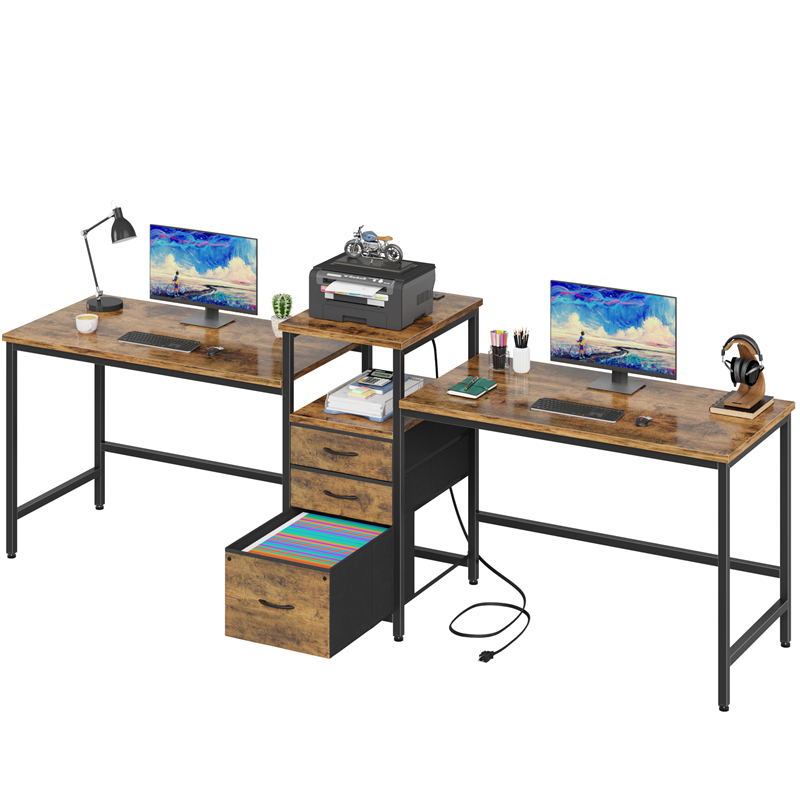
What Changes When the Dock Stays Connected?
A permanent dock changes a shared desk from a clear surface into a fixed workstation, so it suits a room only when both users accept that footprint. The benefit is not that the desk becomes better for work; it is that the screen, dock, power and peripherals stay in one place, cutting the number of connections made before each session. The cost is that the other user must work around the equipment or clear their own items away from it.
Test the occupied footprint with the laptop both open and closed, because a docked laptop may sit shut while a second user needs the same depth for books or a meal. Include the mouse mat, headset rest and any power brick on the floor or desk. The D2007 listing does not give dimensions, so a proposed dock zone must be checked against the seller's figures rather than assumed from a photograph.
The decision also belongs to the person who is not docking. If that person cannot use the remaining surface without moving the dock or unplugging a cable, a permanent setup has effectively taken over the shared desk. Agree the reset rule before buying a dock: which items may stay, which must be unplugged, and where loose cables go at the end of a session.
When Daily Pack-Away Is the Better Shared-Room Choice
Daily pack-away is the better choice when the desk must return to a neutral surface after each session or when no suitable storage exists within easy reach. The condition is not just tidiness: packing away should leave a surface that the next user can use immediately, and it should not require carrying a powered laptop across the room in a way its maker discourages.
Count the real steps in one cycle: open storage, place the laptop, connect power and display, attach any mouse or headset, position the laptop, then reverse it all at the end. Time that once with the equipment you actually own rather than estimating from the number of devices. If the routine is awkward because the storage is in another room, or because cables must be re-threaded each time, the pack-away setup will tend to be abandoned.
Pack-away also asks more of connectors. Repeated plugging is normal for many devices, but the laptop maker's guidance and the connector type matter, so avoid pulling on the cable or using the laptop as a strain relief. A labelled cable set and a single accessible connection point can reduce errors without changing the fact that the desk is cleared.
Storage for Disconnected Equipment: What Needs a Home
Every item that leaves the desk needs a named home, not just a general instruction to put it away. The laptop, dock or hub, power adapter, mouse, headset and any short cables should each have a place that can be reached without moving the other user's belongings. A closed box or drawer can hide the equipment, but it also concentrates heat if a device is stored while charging, so follow the device maker's storage and ventilation instructions.
Measure the storage with the contents inside, including the laptop's thickness and any attached dongle, rather than measuring the laptop alone. Check whether the lid closes without pressing on the screen and whether a power cable can exit without being crushed. The D2007 listing does not confirm drawers, shelves or a cable route, so do not assume the double desk itself provides the pack-away storage.
A separate lidded container can be a reasonable alternative when the desk has no storage, provided it is stable, dry and not treated as a seat or step. The trade-off is another object in the shared room. If storage has to live in the same room, choose a place that is out of the walking route and reachable from the desk without a long detour.
Connector Access Should Be Tested From Each Seat
Connector access should be tested from each person's normal seated position, not from the middle of the desk or from standing beside it. A permanent dock works only if the laptop can be connected and disconnected without crawling under the desk, moving the screen or disturbing the other user. Daily pack-away works only if the cable ends can be reached and returned to storage without straining the plug or the laptop port.
List the connections that must be made each time: power, display, mouse or keyboard receiver, headset and any network cable. Separate the ones that can stay attached to the dock from the one connection to the laptop. If two laptops have different connectors, a shared dock needs confirmed compatibility for both; do not infer it from the desk's model name or from the dock's appearance.
Route cables away from the surface where hands and drinks sit, and leave enough slack for the laptop to be positioned before the plug takes the load. For the D2007, the listing does not show cable openings, so the seller must confirm whether and where cables can pass. A clamp or tray should not be added unless the desk's construction and finish are confirmed as suitable.
Changeover Effort: Measure One Full Cycle
Changeover effort is best measured as one full cycle from a cleared desk to a working setup and back, not as a count of devices. The cycle includes fetching the laptop, opening storage, connecting cables, positioning the screen and clearing the surface afterwards. A permanent dock removes most of that cycle but leaves the equipment in place; pack-away removes the footprint but repeats the cycle every session.
Run a timed rehearsal with the actual laptop, dock and storage. Note where you had to move something, which cable was hard to reach and whether the other user could start their own task during the changeover. If the cycle interrupts a shared room at the times it is most used, a fixed dock zone or a different storage position may matter more than the desk's size.
The practical test is frequency and tolerance, not a universal rule. A desk used for one long session a day may justify a permanent dock even in a shared room; a desk that alternates between work and meals may need pack-away even if the equipment is heavy. Neither choice is automatically better, and a mixed routine may need a shared dock with an agreed reset moment.
How the D2007 Double Desk Enters the Decision
The D2007 listing confirms the model, a double-desk configuration and a Tiger Wood colour designation, which is a colour name rather than proof of solid wood. It does not give dimensions, per-person work area, cable management, storage or supported load, so those points remain unconfirmed until the seller supplies them.
For a permanent dock, ask where each user's usable surface ends and whether a screen or dock can sit without crossing into the other person's space. For pack-away, ask whether any drawer, shelf or cable route is part of the desk and whether an add-on storage unit would obstruct legroom. The decision can be made on the D2007 only after those answers are available; the model name alone does not settle either setup.
If the answers are unavailable, treat the desk as a shared surface of unknown capacity and keep the setup reversible. A temporary dock zone using a mat or tray can be tested without fixing anything to the desk, and the pack-away routine can be trialled with a box before buying dedicated storage.
A Shared Dock Needs a Clear Reset Rule
A shared dock is workable only if both users know what the next person expects to find. The reset rule should cover the laptop connection, the screen position, the mouse and headset, and any cable that crosses the shared surface. A labelled cable and a marked dock position make the rule easier to follow than a verbal instruction.
The rule also needs a place for the laptop when it is not docked. If one user leaves a closed laptop on the desk and the other needs that depth, the shared dock has not solved the surface problem. Store the laptop in the agreed pack-away location or provide a clearly bounded dock zone that both users accept.
Write the reset rule down only after testing it for a week. If it is not followed, the issue may be that the storage is too far away or the cable is too awkward to reconnect, not that the users disagree. Adjust the routine before adding more equipment.
Explore related furniture
D2007 Double Desk — Tiger Wood Colour
Who this helps
Two people share a double desk in a room that also needs to work for study, meals or household tasks. One person wants a permanent laptop dock with a screen and peripherals left connected; the other needs the surface cleared between sessions, and neither is sure where the disconnected equipment would live.
How to make the choice
Choose a permanent dock when the shared desk can keep an agreed dock zone, both users accept the fixed footprint, and the laptop can be disconnected at one reachable point; choose daily pack-away when the desk must return to a neutral surface or no suitable storage is nearby. The trade-off is faster sessions against a surface that is never fully shared.
Information behind this guide
The D2007 listing confirms the model, a double-desk configuration and a Tiger Wood colour designation. It does not confirm dimensions, per-person work area, cable openings, storage, supported load or material. The changeover, storage and connector advice here is general guidance, not a tested property of this desk.
Compare your options
| Option | Consider when | Limitation | What to verify |
|---|---|---|---|
| Permanent dock with fixed peripherals | A shared room where one user works in long or frequent sessions and the other seldom needs the full surface; both accept a fixed zone and a reset routine. | Uses the shared surface all day and leaves equipment visible; the other user may have to work around the dock, and cable routes still need confirmation. | Map the footprint with the laptop open and closed, test one accessible disconnect point, and ask the seller about cable openings and edge clearance on the D2007. |
| Daily pack-away into closed storage | A room that must switch to study, meals or household use, or a shared desk where neither user wants equipment left out between sessions. | Every session adds connect and disconnect steps; repeated plugging, storage distance and the need to clear the surface can make the routine hard to sustain. | Time a full cycle, measure the storage with the laptop and accessories inside, and confirm whether the D2007 provides any drawer, shelf or cable route. |
| Shared dock with a labelled laptop connection | Two users with compatible laptops who can share one dock and want a faster changeover than full pack-away without a permanent personal setup. | Compatibility, charging arrangement and connector type must be confirmed for both laptops; the dock still occupies the surface and needs a reset rule. | Confirm both laptops work with the dock's connector and charging arrangement, and that the desk has room for the dock without blocking the other user. |
Your decision checklist
- List every device that must be connected for a working session and mark which ones can stay attached to a dock.
- Rehearse one full setup and pack-away with the actual laptop, cables and storage, timing it from each user's seat.
- Measure the proposed permanent dock footprint with the laptop open and closed, and check the other user's remaining surface.
- Choose and measure a storage location for the laptop, dock, power adapter and accessories, allowing for a charging device.
- Check connector reach and cable strain from each normal seating position, and confirm whether the D2007 has any cable openings.
- Agree what stays on the desk at the end of a session and who resets shared items.
Related questions
Can a permanent laptop dock share a double desk with a second user?
Only when the second user can still use their own area without moving the dock or unplugging it. The D2007 listing confirms a double-desk configuration but not the width, divider or cable route, so confirm the usable surface for each person. A dock that leaves no clear working area for the other user is not a shared setup, even if the desk is called double.
What should come off the desk in a daily pack-away routine?
Start with the laptop, dock or hub, power adapter, mouse, headset and any loose cables that cross the shared surface. Each item needs a home that is dry, stable and close enough to make the routine realistic. Measure the storage with the equipment inside and check that a charging laptop is not shut into a space its maker says is unsuitable.
How can I test the changeover before buying storage?
Use a temporary box and the cables you already own. Time a full setup and pack-away from your normal seat, including opening storage, connecting power and display, and clearing the other user's space. If the trial requires moving the desk or reaching under it, ask the seller for the D2007's dimensions and cable access before committing to either permanent or pack-away storage.