The retrieval cue decides the folder system
The folder system should match the question you ask when you need a document, not the order in which papers arrive. If you would ask for a bank statement, a warranty or a named supplier, alphabetical filing gives you a predictable route. If you would ask to see the whole set for a renovation, a move or a client job, project folders keep related papers together. Test the choice with three real documents you have filed recently; if you would describe them by different cues, you need a declared primary rule rather than an unstated preference.
Alphabetical filing fails when names are ambiguous
Alphabetical filing works when one primary name is obvious to everyone who files. It breaks down when one person files under the energy company and another under electricity, or when a document concerns a person, an address and an institution at once. A shared heading list reduces that risk, but the list must be short enough to use. Choose the name you would say out loud when requesting the document, and add a see-reference when a second name is likely.
The limitation is grouping. A renovation file, an insurance claim or a house sale scattered across several alphabetical headings will not read as one set. If you often need the set more than the individual document, alphabetical filing creates extra retrieval work even when every folder is correctly labelled. A project folder or a temporary cross-reference list can cover that need, but it must have an owner and a removal point.
Project folders need a boundary and a destination
Project-based filing works when a folder has a clear scope, a person responsible for it and an end point. Active projects need to be few enough to scan at the cabinet. The system fails when routine bills, warranties and identity records are forced into a project folder, or when two projects share the same paper and each filer chooses a different home. Define what counts as a project before labelling: a bounded piece of work with a name both users recognise.
Closing a project is part of the method, not an afterthought. Move the folder to an archive zone or remove it from the active section when the work ends, and record where it went. The FC013 entry does not state drawer count or internal dimensions, so confirm that the cabinet can hold the folder type and volume you plan to use before buying a full set of project folders. A project folder that stays active-looking after the work ends will keep attracting loose paper.
Shared filing needs one naming authority and a misfit route
When two people use one cabinet, the scheme needs a single naming authority even if both people file. One person should own the heading list and the project list, not to do all the filing but to settle conflicts. Put a short rule where both can see it: file by the question you will ask, use the agreed heading, and write a cross-reference when the document has a second likely home. Without that, the same paper can be filed under two reasonable names.
Leave a small route for documents that do not fit. A misfit folder or tray is useful only if someone reviews it and files the contents; otherwise it becomes a second unsorted pile. If the FC013's lock matters to the household, decide what belongs in the locked area and who can open it. The listing confirms a lock but not which compartment it covers, so that decision must wait for the seller's answer.
What the FC013 listing settles before you choose folders
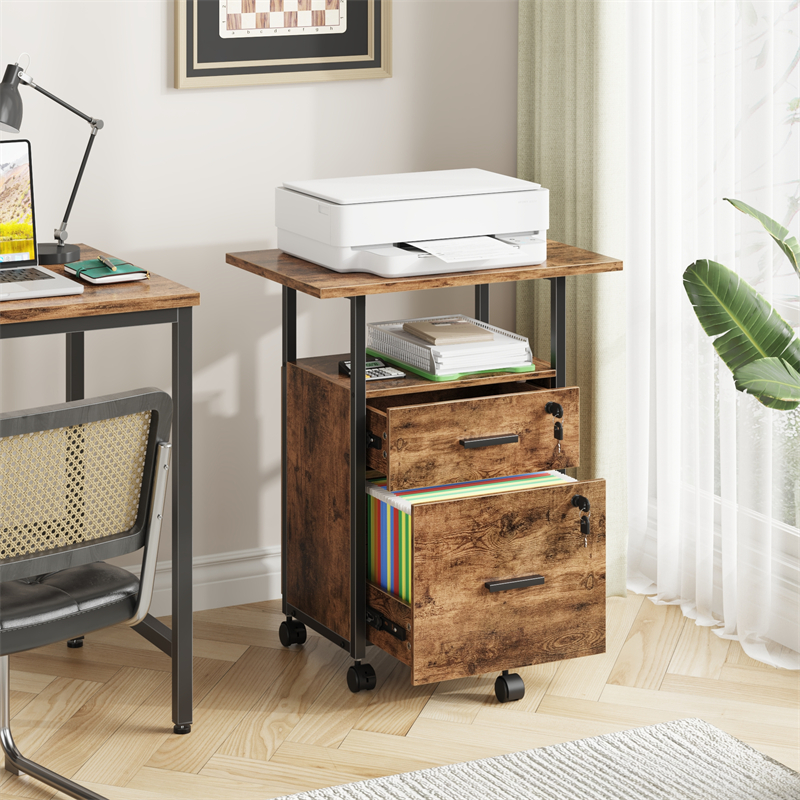
The FC013 listing confirms the model, that the cabinet is listed with a lock and the Tiger Wood colour designation. It does not confirm drawer count, internal drawer dimensions, hanging-rail support, file format compatibility, load limits, anchoring requirements or which compartment the lock secures. Those are the details that decide whether alphabetical or project folders can be used inside it as planned.
Tiger Wood is a colour designation in the listing, not proof of solid-wood construction or a particular finish. Ask for the specification of the exact version you would receive, including internal measurements for the drawers you intend to use. If your folder plan depends on a rail, a specific file size or more than one locked compartment, obtain written confirmation before ordering the cabinet or the folders.
Choose the smallest system that answers both cues
If the paperwork is mostly household admin and both people remember names, start alphabetical and add a single project folder only for an active set that is used together. If the work is project-led and admin paperwork is minor, start project-based with one alphabetical admin file for records that belong nowhere else. The hybrid suits mixed ownership only when the primary home is declared for each document type; otherwise it doubles the filing decisions.
Do not build a full second system across the cabinet on day one. Test the rule on current paperwork, then simplify if you hesitate at the drawer or find the same item in two places. The trade-off is maintenance: project folders need closing, while alphabetical headings need consistent names. Choose the maintenance you will actually keep doing, not the system that looks neater when empty.
Explore related furniture
FC013 Locking Filing Cabinet — Tiger Wood Colour
Who this helps
Two people share one locking filing cabinet for household admin and a few active projects. Each files without asking the other, and they need to find a document by either a name or a project.
How to make the choice
Choose alphabetical filing when the first thing you will remember is a name, supplier, institution or subject, especially if several people file. Choose project folders when documents are used as a set and the project name is unambiguous. If both are true, keep an alphabetical master file and a small active-project section, with one written cross-reference rule.
Information behind this guide
The FC013 entry supplied here confirms only model, a listed lock and Tiger Wood colour designation. Drawer count, interior dimensions, rail support, file format, load limits, anchoring needs and which compartment locks are not stated. The filing comparison is general guidance, not a product specification or independent test; confirm the exact cabinet details with the seller.
Compare your options
| Option | Consider when | Limitation | What to verify |
|---|---|---|---|
| Alphabetical by name or subject | A shared cabinet where people remember the supplier, institution or document subject and need one predictable place to file. | A document with several possible names can land under the wrong heading, and project sets are scattered. | List the exact primary names you will use and test whether every filer would choose the same one. |
| Project-based folders | Active work where papers are read together and the project name is the obvious way you ask for them. | Admin records with no project, closed projects, and documents shared by two projects can stall filing. | Define when a project folder opens and closes, and where non-project paperwork goes. |
| Alphabetical master index with active project folders | Mixed paperwork where some items are looked up by name and some are used as a project set. | Needs a written rule and cross-references; otherwise the same document is filed twice or lost between systems. | Decide the primary home for each document type and record the secondary location in one index. |
Your decision checklist
- Write down the phrase you would use to ask for each document, then make that phrase the primary folder heading.
- Agree one heading list before labelling anything, including which person may add a new heading.
- Give project folders a named owner, a start point and an end point; put routine bills and admin elsewhere.
- Record a cross-reference in the index when a document has a second likely home, rather than making two full folders.
- Confirm the FC013's drawer count, interior dimensions, rail support, file format and lock coverage before buying folders or relying on the lock.
- Review the system when you hesitate at the cabinet or find the same document in two places, and simplify rather than adding more labels.
Related questions
Where should a document go when it belongs to a project and a supplier?
Pick one primary home using the cue you will use first. If you will search by supplier, file the document alphabetically and note the project on the folder or in an index. If the project set is what you open together, file it there and note the supplier. Avoid keeping two full copies as the working record, because updates will diverge; use a cross-reference instead.
Can one cabinet use both alphabetical and project filing?
Yes, if the cabinet is divided into declared zones and a single index says which zone is primary for each document type. The condition is a written rule that both users follow; without it, hybrid filing creates two plausible homes. Start with a small active-project section and an alphabetical master file for everything else, and close project folders when the work ends.
Does the FC013 lock secure every drawer?
The supplied FC013 entry says the filing cabinet is listed with a lock, but it does not state which compartment or compartments the lock covers, nor any security, fire or water-resistance rating. Ask the seller which drawers lock and whether the cabinet needs anchoring. Do not treat the presence of a lock as evidence that the whole cabinet, or the documents inside it, are protected to a particular standard.